
Last updated: May 13, 2026 | Reading time: 10 minutes
If you built your site on Weebly because it was simple, affordable, and just felt like it would work, and now you’re staring at flat traffic, wondering if that was a mistake, you’re in the right place.
You’ve probably asked, “Did I build my business on the wrong foundation?”
Weebly gives you the basics most small business websites actually need. You’re talking about editable titles, meta descriptions, URLs, alt text, and connections to Google Analytics and Search Console. For a simple service site or a brochure-style homepage, that’s genuinely enough.
So, is Weebly good for SEO? Yes, it does but up to a point.
But whether it will support your business in two years when organic search is supposed to be a serious lead channel for your business is an entirely different question.
What Weebly does well for SEO
A lot of Weebly SEO conversations usually land in one of two places: “Weebly is totally fine” or “delete everything and move to WordPress.” Neither is quite right.
For a small and simple site, Weebly easily covers the fundamentals:
- Custom page titles and meta descriptions — You can write your own titles and meta descriptions for each page, which helps Google understand what your content is about and improves how your site appears in search results.
- Mobile-responsive templates — All Weebly templates automatically adjust to look good on phones and tablets, which matters for SEO since Google ranks mobile-friendly sites higher.
- SSL security — Your site runs on HTTPS by default, which is a basic trust signal Google looks for when ranking pages.
- Editable URLs and image alt text — You can customize your page URLs and add descriptive alt text to images, both of which help search engines index your content more accurately.
- Built-in blog — Weebly includes a basic blogging tool so you can publish content without needing a separate platform.
- Google Analytics and Search Console integrations — You can connect both tools directly to your Weebly site to track traffic, monitor performance, and see how your pages are indexing.
- Basic sitemap generation — Weebly automatically creates a sitemap and submits it to Google, which helps search engines find and crawl your pages.
A therapist trying to rank for “anxiety therapist in Chicago” does not need enterprise-level technical infrastructure. Clear content, good local signals, and consistent updates matter more than which website builder is running underneath it all.
That said, Weebly has a ceiling. The more seriously you pursue SEO, the faster you’ll find it. Knowing what the best CMS for small business SEO looks like is worth figuring out before you actually need to make that call.

Can Weebly rank on Google?
Definitely, yes! There are Weebly sites ranking right now for local searches, service keywords, and niche blog content. Google doesn’t actually penalize a website for being built on a drag-and-drop builder.
What Weebly can’t always do is scale those rankings. Emphasis on always.
A local bakery can rank on Weebly with solid content and basic local SEO. A multi-location business trying to build hundreds of optimized pages, a schema strategy, multilingual content, and a blog-driven funnel will hit walls much faster.
Weebly can rank on Google if you have modest goals. But if you have bigger plans for your business down the line, choosing Weebly isn’t the best choice.
Where Weebly SEO falls short for growing businesses
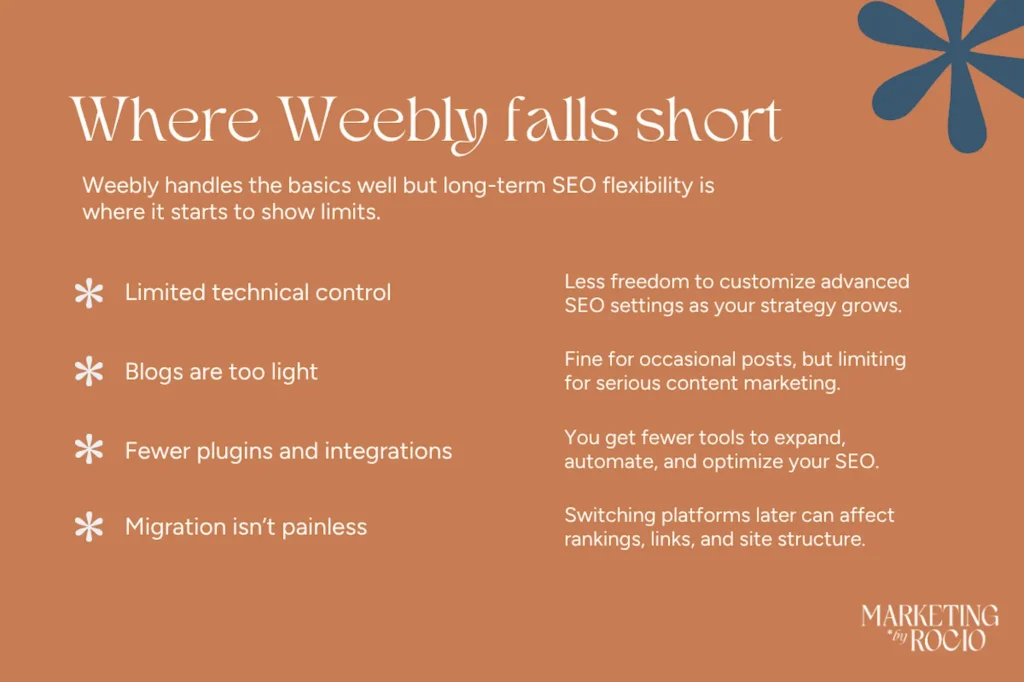
Having SEO settings isn’t the same thing as having SEO flexibility. Weebly gives you enough to handle the basics. But it doesn’t give you room to grow beyond them.
Some of the main differences are the following, and checking your CMS if it’s SEO-flexible can be useful.
Limited technical control
Advanced Weebly SEO often runs into real constraints like schema markup customization, redirect management, crawl optimization, and structured internal linking. Weebly handles some of this, just not with the depth that platforms like WordPress offer.
Blogging feels lighter than it should
A strong content strategy matters for rankings. Weebly has a blog, but the system is lighter than WordPress when it comes to categories, content workflows, plugins, and publishing tools. If blogging becomes central to your strategy, it can start to feel more taxing than rewarding.
Fewer integrations and plugins
WordPress has a massive plugin ecosystem for SEO, schema, redirects, speed optimization, and multilingual support. Weebly’s ecosystem is smaller, which isn’t a dealbreaker at first. This is more of a yellow flag rather than a red one.
Migration is not painless
A lot of business owners eventually start switching website platforms for SEO after outgrowing Weebly. Moving platforms affects URLs, rankings, redirects, and indexing. None of that is irreversible, but it has to be planned carefully. Our SEO website migration checklist is a good place to start before you touch anything.
Want more insights like this?
I send out a monthly newsletter where I unpack everything from SEO-first strategy to real client lessons and the behind-the-scenes of building a values-led digital business. If you’re into honest takes on what makes websites actually work (not just look good) you’ll probably want in.
Weebly vs WordPress, Wix, and Squarespace
By now, you’ve probably noticed WordPress keeps coming up. That’s because Weebly vs WordPress SEO is the comparison most people land on, and for good reason.
WordPress generally wins for long-term flexibility. It gives you deeper customization, stronger technical SEO capabilities, better blogging infrastructure, and a much larger plugin ecosystem.
If organic search is becoming a serious metric for your business, WordPress tends to offer fewer limitations. But it also comes with more responsibility. You have to manage plugins, hosting, and occasional technical maintenance when needed. A neglected WordPress site can perform worse than a well-maintained Weebly site.
This guide on WordPress and SEO in 2026 goes deeper into when the switch actually makes sense.
A lot of older Weebly SEO advice still treats Wix as the weaker option, but that take is actually outdated. Wix now offers real flexibility for small business owners who want more customization without committing to WordPress. Meanwhile, Squarespace tends to win on design and blogging experience, though it has its own limits at the advanced technical level.
One thing you have to remember is that there’s no universally perfect best website builder for SEO.
Every platform has its own tradeoffs, and the right one depends on your business model, content strategy, comfort with tech, and where you’re trying to go.

Is Weebly the right fit for your business?
The answer really depends on what stage your business is at, and what you’re actually asking your website to do.
Brand new business or simple brochure site
Weebly is fine. Get your pages live, start building content, and focus on local signals. Choosing Weebly for your business isn’t going to be a problem at this stage.
Local service provider with modest SEO goals
Often fine for a while. You may run into limits as your content strategy grows, but there’s no reason to panic and migrate right away.
Content-heavy strategy or blog-driven lead generation
This is where Weebly SEO starts to feel a bit restrictive. If organic search is supposed to be doing real work, the platform may start to feel like SEO in a shoebox.
Scaling, multilingual, advanced technical SEO, or multiple locations
Seriously consider migrating. The workarounds for trying to make everything work while staying on Weebly will get expensive fast.
Think of Weebly like training wheels. They get you moving, help you build confidence, and keep things stable while you’re still figuring out what your website actually needs to do.
But at some point, the training wheels stop helping you and start slowing you down. At this point, you’ve outgrown the platform, and it’s time to move forward.

When it may be time to move
Weebly can take you pretty far, and honestly that’s a win in itself. But there’s a point where the platform stops keeping up with your business, and pushing through gives you more frustration than you need. Here are a few signs it might be time to make a move:
- SEO is becoming a primary source of leads. If organic search is supposed to be bringing in consistent traffic and inquiries, you need a platform that gives you real control over how your content performs.
- You’re publishing blog content regularly and need a more robust system. Weebly’s blog works fine for occasional posts, but if content is central to your strategy, you’ll quickly outgrow it. Organizing posts, building internal links, and managing categories gets messy before you know it.
- Your site structure is expanding beyond a few core pages. The more pages, service areas, and landing pages you add, the more you need a CMS that handles clean scalable site architecture.
- You need schema markup, redirect management, or other technical SEO tools. These are standard at more advanced stages of SEO, and Weebly doesn’t give you much room to work with them.
- You’re constantly finding workarounds just to do basic things in the builder. If you’re spending more time fighting the platform than building your site, that’s a signal worth taking seriously.
- You’re planning multilingual content or multiple location pages. Weebly’s infrastructure wasn’t really built for this kind of complexity, and trying to force it usually creates more problems than it solves.
This is where businesses should start seriously exploring the best website builder for SEO for their next stage.
Frequently asked questions about Weebly SEO
Yes, for basic small business websites. Weebly SEO includes core features like editable titles, meta descriptions, alt text, and mobile-friendly templates. It handles the fundamentals well enough that a simple service site or local business page can rank for the right searches without needing anything more advanced.
The biggest downsides are limited technical SEO flexibility, fewer integrations, a weaker blogging ecosystem, and scalability challenges as your content strategy grows. These won’t matter much for a simple five-page site, but they become real friction points once you start publishing consistently or building out a more complex SEO strategy.
Yes! Many small businesses, freelancers, and service providers still use Weebly because it’s simple and affordable.
For SEO flexibility and ongoing development, Wix generally offers a bit more. Some users still prefer Weebly’s simpler interface, but if SEO is a real priority, Wix could give a little bit more flexibility. But objectively, neither are great for SEO.
This depends on your goals. WordPress offers the most SEO flexibility and is the strongest choice for content-heavy strategies. Squarespace and Wix sit between ease of use and customization, making them solid middle-ground options for service-based businesses that want more control without the full learning curve of WordPress.
Generally, yes. Weebly’s interface is more intuitive for people who don’t want to manage hosting, plugins, or technical maintenance. WordPress has a steeper learning curve but gives you far more control over SEO, design, and scalability as your business grows.
Weebly generally has stronger design flexibility and a more user-friendly editing experience. Both have real limitations for advanced SEO growth, though if long-term organic search visibility matters to your business, neither is the strongest foundation to build on.

Know more what you can do with your Weebly website
A lot of business owners quietly carry the fear that they built on the wrong platform. But it’s not always a black or white situation.
Sometimes the site needs better content or a clearer SEO strategy. Sometimes the platform really is becoming a wall. And sometimes it’s all three at once. Weebly is rarely the single thing standing between you and consistent leads.
If you’re not sure whether to optimize, redesign, or migrate, our team at Marketing by Rocio works through exactly this kind of decision with you.