Last updated: April 28, 2026 | Reading time: 9 minutes
Most people don’t regret their platform on the first day. They regret it six to twelve months later, when their traffic is flat, every fix feels complicated, and migrating everything sounds like a nightmare.
That’s the real story behind WordPress vs Squarespace vs Wix SEO. Other guides may compare pricing plans and template counts like you’re decorating an apartment. Meanwhile, you’re asking the actual question: Will this platform hold me back when I start taking search visibility seriously?
Why most content management system (or CMS) comparisons don’t help you decide
Most articles about Wix vs Squarespace vs WordPress just list features. Templates, drag-and-drop editors, app stores, and monthly costs.
Those are fair things to consider, and you should consider them. But what happens to your SEO when your business grows and content becomes a real priority?
That’s when you realise not all CMS platforms are built equal. Knowing which one fits where your business is now and where you want it to go makes all the difference.

If you want control and long-term SEO growth: WordPress
Let’s address the elephant in the room. Yes, WordPress is more complex. And yes, that’s exactly why it works.
When people ask which website platform is best for SEO, WordPress comes up repeatedly for good reason. You control everything: site structure, technical SEO, plugins, URL patterns, and content scaling. All of it.
But as Uncle Ben said, “With great power, comes great responsibility.” That control only matters if you use it well. A messy, slow, or overbuilt WordPress site will tank your SEO just as fast as any other platform. So “more control” doesn’t automatically mean better results. What it means is more ceiling.
If you’re planning to publish consistently, build topical authority, and scale content over time, it’s hard to argue against it. This guide we wrote on WordPress SEO in 2026 goes deeper into where it shines and where it trips people up.
Choose WordPress if:
- You’re planning to invest in content long-term
- You want full SEO flexibility and technical control
- You’re okay with a learning curve or hiring support
And if you’re wondering why use WordPress instead of Wix, that’s your answer. WordPress grows with you instead of quietly boxing you in, which can be a real problem for Wix users (more of this below!).
If you want simplicity without completely sacrificing SEO: Squarespace
Squarespace sits in a comfortable middle ground. Clean, structured, and predictable. For many service-based businesses and small businesses, that’s often enough.
When comparing Squarespace vs WordPress SEO, the difference isn’t that Squarespace is bad. It’s just that it’s a bit more… limited.
You get less flexibility with things like URL structure customization, advanced technical SEO settings, and deep content hierarchies at scale.
Those are the real Squarespace SEO limitations, and they become harder to work around as your strategy gets more sophisticated and your business continues to scale.
That said, a well-structured Squarespace site will consistently outperform a chaotic WordPress one. If your site is relatively simple and your content strategy isn’t going deep, the platform won’t hold you back. This breakdown of Squarespace SEO in 2026 covers where it works best.
Choose Squarespace if:
- You’re a service provider with a clean, simple site structure
- You want something low-maintenance that looks great
- SEO matters, but you’re not planning an aggressive content strategy

If you want fast and easy (and can accept the tradeoffs): Wix
Okay… Okay… Wix has genuinely improved. That needs to be said upfront.
A few years ago, the answer to WordPress vs Wix SEO was pretty lopsided. Now it’s more nuanced. You can absolutely rank with Wix, if you have SEO in mind. For small, straightforward sites, it works fine.
But the Wix vs WordPress pros and cons conversation shifts the moment you start to grow.
URL flexibility, site architecture, and advanced SEO controls start feeling restrictive. It’s a pattern that comes up again and again from business owners who loved Wix at launch but felt stuck just a few months later. If you have big plans for your business and need a platform that can keep up, Wix likely isn’t the right fit. There are far better options worth putting your money into.
For a full breakdown of where it works and where it doesn’t, this guide we created about Wix SEO in 2026 covers it well.
Choose Wix if:
- You need something live quickly
- Your site is small and straightforward
- You’re not planning heavy SEO investment anytime soon
And if you’re asking which is better, Wix, Squarespace or WordPress for the long haul: Wix is rarely the answer. But for the right short-term situation, it can be exactly the right one.
Want more insights like this?
I send out a monthly newsletter where I unpack everything from SEO-first strategy to real client lessons and the behind-the-scenes of building a values-led digital business. If you’re into honest takes on what makes websites actually work (not just look good) you’ll probably want in.
The real question: how much do you want to grow?
Answering this question is where most people get stuck. They compare tools when they should be asking what they actually need from those tools.
If you’re a local service business with five core pages, the best website builder for SEO isn’t necessarily the most powerful one available. It’s the one you’ll actually use consistently and well.
But if you’re building a content-driven brand or planning to scale visibility over time, the decision changes completely. Platform choice becomes infrastructure, not just aesthetics.
That’s exactly why we created these articles (best CMS for small business SEO and switching website platforms for SEO) to help you out. Whether you’re starting fresh or already feeling stuck on your current platform, both guides are worth a read before you make any decisions.
A simple way to decide (without overthinking it)
For the Squarespace vs Wix vs WordPress question, the decision usually comes down to one question: where is your business actually headed? Think about where you want to be in 6 to 12 months. If you already have that vision, you’ll have a much clearer idea of which CMS makes the most sense for you.
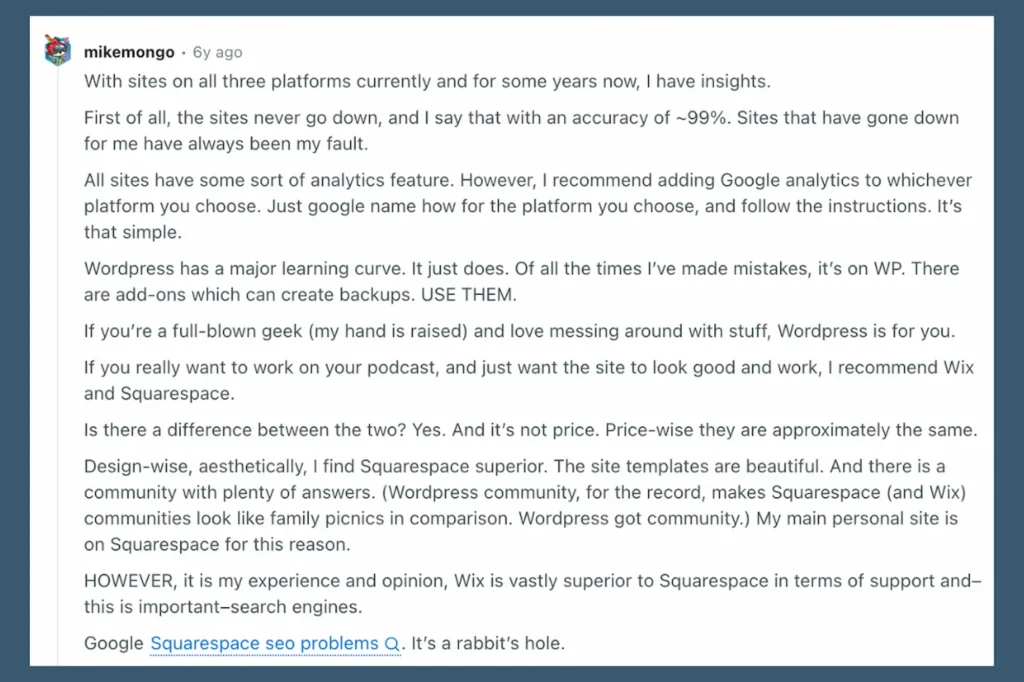
Caption: Reddit comment from user mikemongo comparing WordPress, Squarespace, and Wix for small business websites.
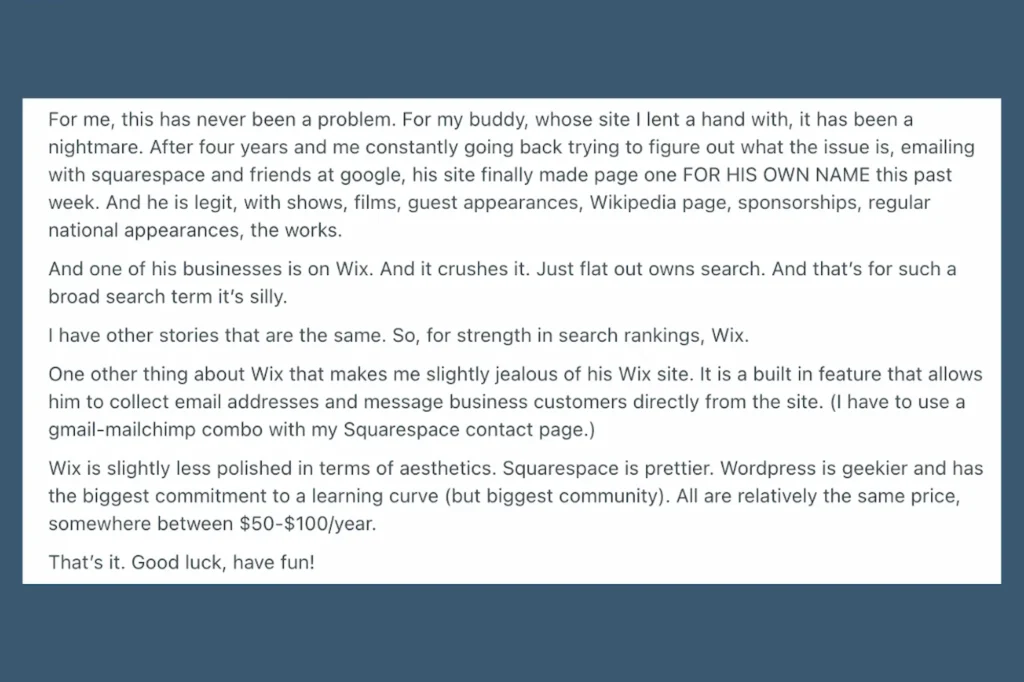
Caption: Continuation of Reddit comment where mikemongo shares how a Wix site outranked a Squarespace site in Google search results
Just a quick summary:
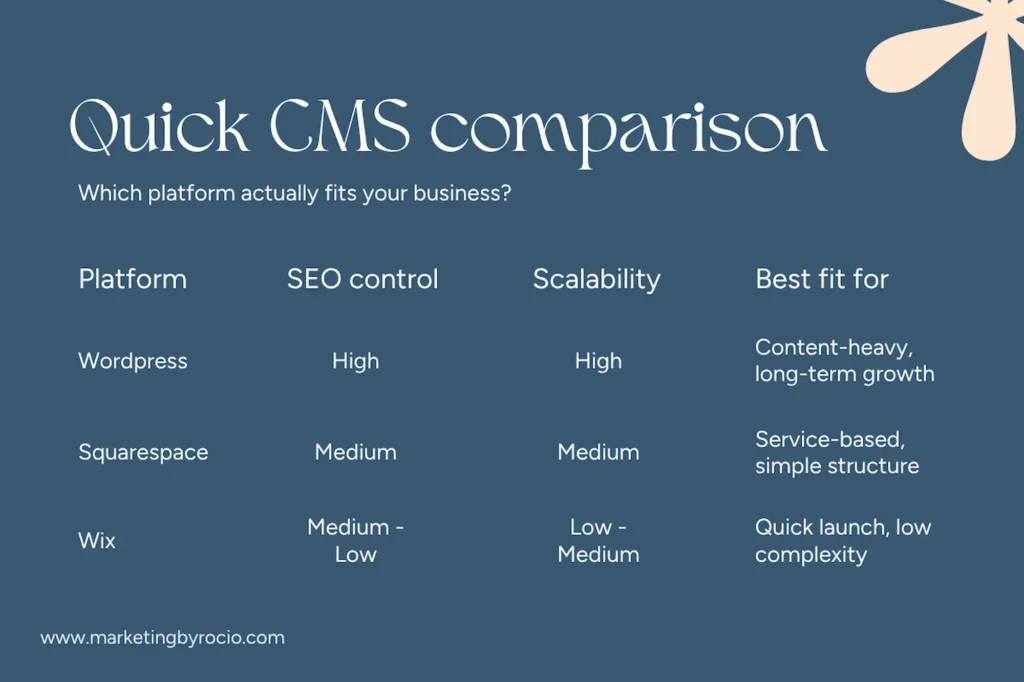
- Content-heavy and growth-focused —>WordPress
- Service-based and clean —> Squarespace
- Quick launch, low commitment —> Wix
And if you’re curious about what are the top website builders in 2026 beyond these three, WordPress, Squarespace, and Wix are the usual starting points, but Webflow, Framer, and Shopify are worth knowing about depending on your direction.
Frequently asked questions about choosing the best CMS
It can, but a properly planned migration with redirects and consistent URLs usually holds most of your rankings. This SEO website migration checklist walks through it step by step.
Generally three to six months before you see meaningful movement, sometimes longer for newer domains. Consistency with content and technical setup matters more than which platform you choose.
Basic on-page SEO is absolutely something you can handle yourself, especially on Squarespace and Wix. The more technical stuff on WordPress is where hiring support starts to make sense.
Yes, a whole lot. Slow hosting directly affects your Core Web Vitals, which Google uses as a ranking signal. Cheap shared hosting that loads in four seconds will undercut even great content.
This is more common than you’d think. The guide on how to tell if your web developer understands SEO gives you a clear checklist to work through. Spoiler alert: making sure that SEO is embedded in your website on day one is way more important than you thought.
Not necessarily, but consistent helpful content is one of the most reliable ways to build authority over time. Service pages alone can rank, but they hit a ceiling without supporting content around them.
For certain businesses, yes. Webflow sits between Squarespace and WordPress in terms of design flexibility and SEO control, though it has its own learning curve. Worth looking at if neither Wix nor Squarespace feels quite right for you and your business.
Squarespace and Wix both have affordable plans that cover the basics well. WordPress is technically free, but factor in hosting, a theme, and plugins, and the real cost adds up. Don’t forget the most expensive thing you have to factor in… your time.
If you’re already overwhelmed, that’s normal

Choosing a platform feels bigger than it should because you know it affects everything downstream. The structure, the SEO, and the scalability all connect.
But you don’t need the perfect platform. You need the right one for how your business actually runs right now.
If you want help thinking this through, not just picking a tool but structuring your site for SEO from day one, you can reach out to us!
Marketing by Rocio has helped many small local businesses improve their SEO and online visibility. We know that choosing the right CMS can have a real impact on your business, which is why we take an SEO-first web design and development approach with every client we work with.
Reach out to learn more!